In the DOM interface, all options I found reset the entire “bid/ask traded size” column instead of just one cell. I’d like that after the price moves away, when it comes back to that price, only that specific @bid/@ask will reset. This way, all cells will show the cumulative trade size for that certain bid or ask only from the time the price reached there for the last time. I know JigSaw, MotiveWave, ATAS, and NinjaTrader all have this feature, but how do I enable this with Optimus Flow?
Hello @gabriel,
Thank you for your question.
There are several configurable settings related to the recent bid/ask trade size on Optimus Flow, that allow you to customize the “reset behavior” of this column.
To access this setting, please right clicking within the Price column of your Optimus Flow DOM and go to settings.
Within settings, under the VIEW tab, scroll down until you access “RECENT BID/ASK TRADE SIZE”:
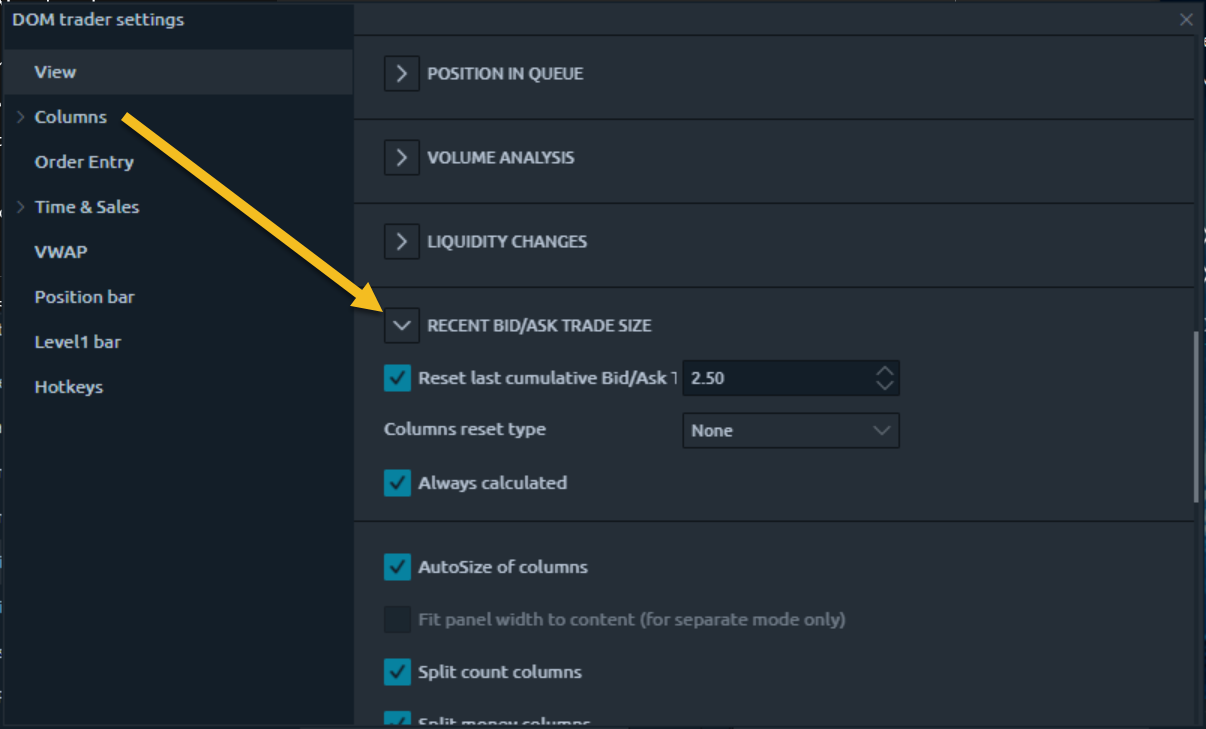
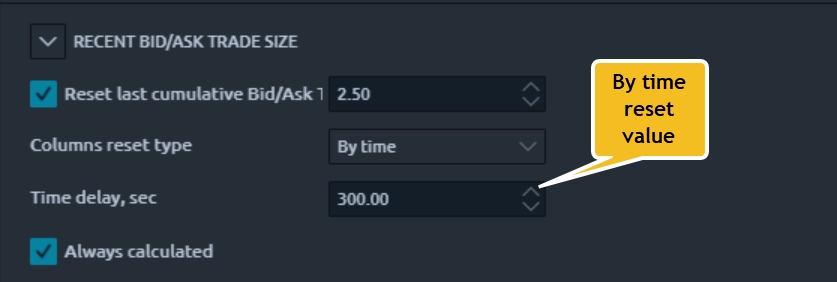
There are four selectable column reset types: None (Default), By time, By trades count, or by price change. Once you select your desired reset type, an additional dialogue box will populate below this option, allowing you to configure your reset value - for example, here is the configuration window for “by time” which will automatically reset the column after your desired seconds interval:
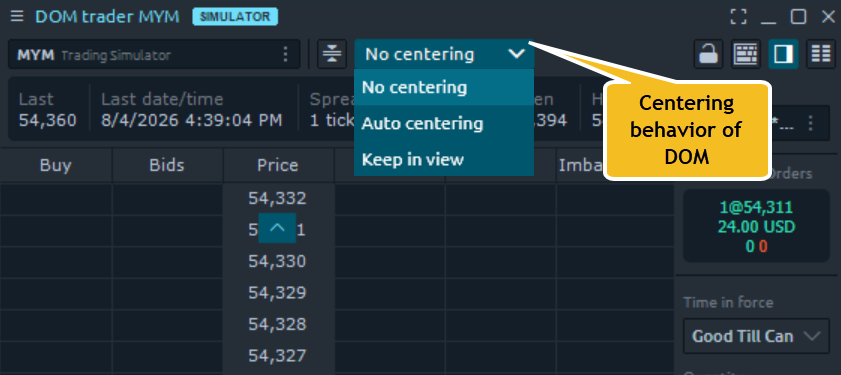
On a separate note, you can configure the centering behavior of your DOM at the top of the panel:
We hope you find this helpful. If you have any further questions or need additional help, please let us know!
Best,
Optimus Futures Support
Hey Jake,
Thank you. Your post is very educational. My question is how to reset the individual cell instead of the entire column. For better understanding, I recorded this price action on the DOM interface of ATAS. This link will expire in 2 days: Watch Screen Recording 2026-08-04 171053 | Streamable
As you can see at time 00:40, the price moves up 1 tick from 109’075/109’080 to 109’080/109’085. When that happens, you see the traded bids at 080 go from 2575 to 777, and the traded asks at 085 go from 46 to 1. The reason why that number decreases is because that individual cell resets once the price moves there. Note that only that cell resets and not the entire column (the traded sizes at the other bid and ask levels remain unchanged).
You can see this happens again in the video at time 00:58 when the price moves down a tick from 080/085 to 075/080. The traded ask size goes from 1611 to 12. If you slow down the video, you can actually see that the cell goes blank before the 12 shows up there. That is because that specific cell (and just that one cell) resets once the price moves there. Then, the cell starts counting the cumulative sum of asks traded since the price last moved there.
This action repeats throughout the video, but I assume you understand what is happening. In sum, my question is: how do I configure the one cell (in the bid or ask traded size column) to reset when the price moves there?
Hi @gabriel,
You’re very welcome, and thanks for the kind words. Thank you as well for your clarification.
We have consulted with our developers regarding this matter, and this is what they informed us.
According to our platform developers, Optimus Flows logic works the same or in a similar way to the other platforms you’ve mentioned.
By default, data is accumulated in the cell until there have been no trades for 2.5 seconds.
You can set this value to a higher number if you wish. Then, if a new trade comes in, the cell will start accumulating values again.
If a bid/ask price is returned to the cell but no trade takes place, the cell becomes empty.
What our developers described above, in combination with my original response, is the closest configuration you can get to what you are asking for related to the bid/ask trade size column on Optimus Flow.
I hope you find this follow-up response helpful.
Best,
Optimus Futures Support
1 Like
Hey Jake,
This follow-up response was very helpful. I appreciate the effort.
2 Likes