TradingView Trading Platform Questions

Hi @skfutures,

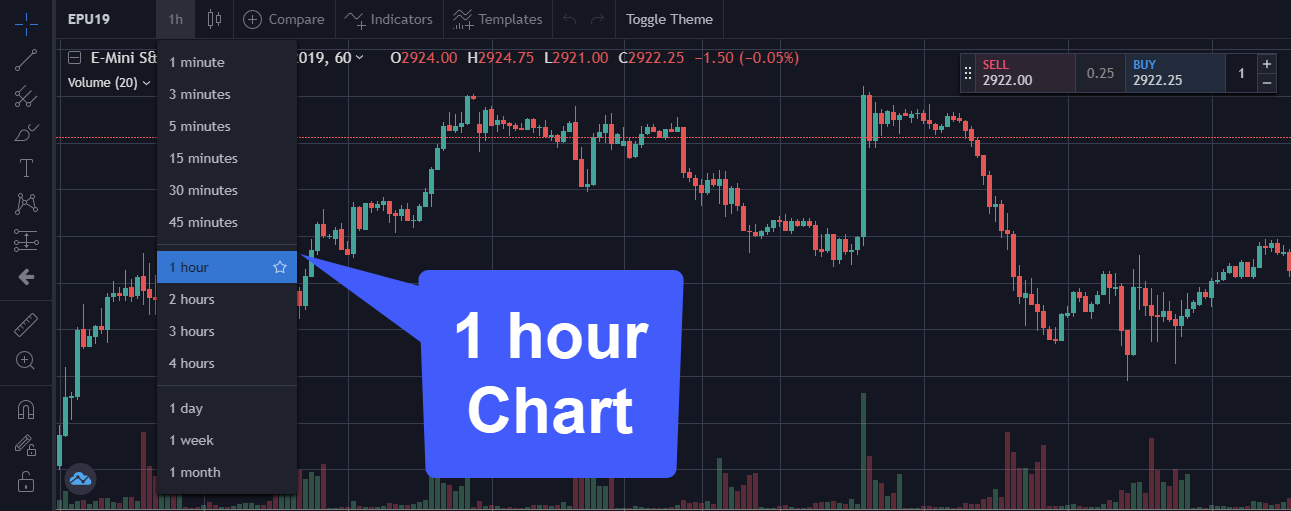
Although it may not be entirely accurate for you at the time of your demo, both TradingView and CQG’s version of TradingView do have 1 Hour Charts.

A 1 Hour chart can be selected by clicking the time interval drop down menu as shown below and selecting 1H: image

As far as I know, my chart seems to be fairly accurate using the 1h time interval. That being said, I am also using a live data feed here. Would you mind taking another small screen cap video showing off the differences between both platform environments? This would allow us to see the differences ourselves and reach out to CQG/TradingView with some evidence to this issue.

Thanks,
Jake
Optimus Futures Support

2 Likes

Here are two clips. One for tradingviewdotcom and one for the cqg.tradingdotcom

TradingView
https://www.screencast.com/t/lnApZjIdbkr

cqg.tradingview
https://www.screencast.com/t/dKHaH6DV

As you can see the cqg candle time is wrong. 8:00 then 8:30 and so on until intraday market close.

I hope to hear from you soon.

Hi @skfutures,

Thanks for providing me with those two videos so we could see a comparison.

I do see the issue you are facing, however, it doesn’t seem to be entirely consistent. The CQG candle time seems to be primarily in 1 hour intervals until you hit 8:30, after 8:30, it then seems to go back to the one hour interval.

I took a look at our own live datafeed on cqg.tradingview.com, using a 1 hr time interval for the EPU19 and similar things happened to my own chart. It wasn’t consistent either, but I noticed every few hours an interval would jump by 30m rather than 1H.

Now that I see the issue you are facing, I’m a bit more informed with what is going on here. Unfortunately, I do not have an answer for you at this time. I do not know if it is an issue with the interface or if there is something going on within the market that is causing this to occur. I’ll be reaching out to TradingView and CQG to see if we can find an answer for this issue.

Thanks for your patience,
Jake
Optimus Futures Support :optimus_logo_no_backroug:

1 Like

Thank you Jake,
It prints like this when market opens 8:30 chicago time.
It always do this RTH open and prints every one hour ending in :30min then resets again when RTH close printing every one hour ending :00 min.

@skfutures

Hi Andrew,

We just received word back from CQG support.

Apparently, the issue you are experiencing is considered a session situation. This appears to be default on the CQG data feed.

Some native CQG products have the ability to handle this by creating custom sessions, however, I don’t believe TradingView has such a capability at this time. If TradingView did have custom sessions, you would essentially be able to eliminate the time interval changing at market open.

I hope this clears things up!
Thanks,
Jake
Optimus Futures Support :optimus_logo_no_backroug:

1 Like

Hi there

Regarding Tradinview.

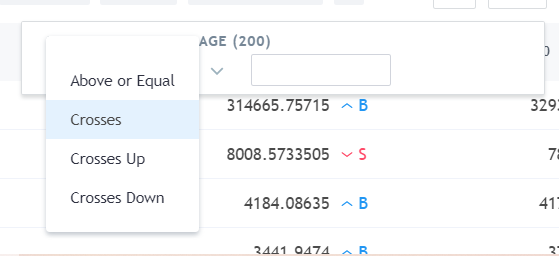
Do you know what “Value” to use/put in in the stock screener on MA200 (or 50) if:

  • You wanna see the MA cross up the MA200 (Golden Cross)?
  • If you wanna see the chart line cross up on MA 200?!

Udklip%20200|559x256

I cant really figure it out with the “Value” parameter (i have attached file).

Happy New Year…

BR
Henrik

Hi @Henrik_Mouridsen,

Thanks for your question and welcome to the community forum.

Being that we are Futures brokers, we typically do not use the stock screener feature within TradingView as we have no need for it, so we aren’t too familiar with it’s functionality/features.

That being said, we’d be more than willing to help you! The file/image you attached is unfortunately not recognizable. Can you please attempt to add it using a different method? As of right now, we cannot see what you are referring to so it is a bit hard to assist you.

Please provide us with a valid screenshot so we have a better understanding of where you are in the platform + what you are trying to accomplish and we’ll attempt to help you the best we can!

Thanks,
Jake
Optimus Futures Support :optimus_logo_no_backroug:

There one little problem I found: in the hourly charts Tradeview starts with a one hour candle whereas most charting platforms start with 30 and then they go to one hour. Is there a way to change the settings?

Hello @itasurfer,

Thanks for your question and welcome to the community forum!

I’ve just attempted to search for this myself and I cannot find any configurable setting related to candlesticks outside of the default settings. I do not see anything related to candlestick formations that can be configured on TradingView.

You could always look for a third-party custom script or indicator created by another TradingView user, but this is obviously not something found on the default platform.

If I find anything on this I will respond to this thread. If you end up finding this setting, I would love to hear how you configured it!

Thanks for your time,
Jake
Optimus Futures Support

Hi,
is it possible to create a OCO if Im already in a position?
Ive only seen videos where OCOs are created before a trade is taken but never after.
thanks
Zoran

Hello @zorannn,

Thanks for your question and welcome to the community forum.

As far as I know, at least with TradingView, no this is not possible. Although I do believe it is configurable on other platforms.

With TradingView, you can right click your chart > trade > Enter New Order and enter additional orders as needed, but I do not think you can group existing orders/brackets as an “OCO Group” so when one order gets filled the rest cancel out. You can add additional OCO/brackets, but they will not be associated with already existing ones.

The only way to do something remotely close would be to manage these orders manually, but that is not exactly an OCO order.

I hope that helps,
Jake
Optimus Futures

2 Likes

Hi, I’m new in the community and I’m not sure if this has been asked already…

I can’t seem to find how to place multiple targets on Tradingview (or CQG Desktop). I want to test a 2 targets strategy on MNQ. I’d like to place a limit order with say 2 contracts where target 1 is a parked order at 1:1 and target 2 is a separate parked order at say 3:1. I know Tradingview and CQG Desktop don’t have the multiple targets option available, but I thought there was a way around by placing 2 separate orders where both would have the same stop but 2 different targets. This doesn’t work because when the limit entry triggers, it combines both orders into 1 order with 1 stop and 1 target.

Any idea if there is another way to place 2 separate targets?
Thanks

1 Like

I think I found a way to make this work using Tradingview.
When I place 2 separate orders with 2 different targets they will merge into 1 order (1 stop + 1 target) if both orders have the same duration “GTC” or “DAY”. However, they will NOT merge if they have a different duration… say the first order is “DAY” and the second order is “GTC”.

Problem solve for now!

1 Like

Hi, @SimonL Welcome to the community! Glad you sorted it out.
Jake @Mod-JakeM made a video not long ago about the integration of CQG and Desktop:

I hope this helps you, and we welcome more questions and comments from you.

Thanks,
Matt

2 Likes

For those interested, we’ve also created a new video demonstrating CQG integration between MetaTrader 5 (MT5) and TradingView:

Thanks,
Jake
Optimus Futures Support

I have a free version TV account and my broker is Webull. I’m having an issue trying to make fractional share trades via TV with my Webull account.

Webull allows fractional share trading for certain stocks. When I choose to trade one of those allowed stocks in my TV chart, TV won’t allow me to enter a value less than 1 in the “units” section. It states “Specified value is less than the instrument minimum of 1,” and the value input box remains red, not allowing me to make a trade unless I input ‘1’ or more into the units box.

The same issue occurs in my TV PaperTrading account.

How can I trade fractional shares?

We are a Futures broker, www.optimusfutures.com so we are not sure how to help on shares, if you ever decide to trade futures through us, i’d be happy to help.

Matt Z
Optimus Futures

I am a new client here from Germany.

I have an Optimusfuture account and a Tradingview Premium account and i plan to make automated trades over the TV-platform.
What i did not find out: where from can i buy the realtime datafeed for Tradingview?
Is it to buy here or in Tradingview directly?

And another question: in your onboardingform i was asked about the Market Access. I had to select CME Bundle, CME, CBOT and others. Why did you ask that - and does it cost money to select some? Or is that order for realtime data? I did not find the answer on your website, in the form or in this community.

On Friday i sent many E-Mails to accounts. and to Jake but nobody answered. Is that not the correct adress for support or did you have holiday in the USA?
In Europe we had to work :hot_face:
Thank you.
Ralf

Hello @Ralf, and welcome to the forum.
Yes, we recently had a major holiday in the United States — Thanksgiving — which may explain the delay in responses.

Here are the answers to your questions:

1) How can I receive data for Tradingview?
Optimus Futures can provide both market data and order-routing connectivity to Tradingview. Once your account is approved and enabled, you can receive quotes and place trades through the supported data feed.

2) Does each individual futures exchange cost money?
Yes. Each futures exchange charges its own market data fee because each lists different products.
To help manage costs, you can subscribe only to the exchanges you intend to trade.
For example:

  • If you only trade equity index futures, you may subscribe just to the CME.
  • The CME Bundle is only necessary if you trade products across multiple CME Group exchanges (CME, CBOT, NYMEX, COMEX).

Choosing only the specific exchanges you need can help reduce monthly data fees.

3) Are the specific prices for each exchange listed somewhere?
Yes. The full list of exchange data fees appears on the Market Access section of the onboarding form, where each exchange and its pricing is shown in a table.

Please note that the Accounts team assists with account-opening questions only. The Support team will follow up with any trading, platform, or data-feed questions.

Thank you,
Matt Z
Optimus Futures

Hello Mod-MattZ,

thank for your answers on sunday afternoon. Today we had a holiday :palm_tree:
To your answers:

  1. what is better for automated trading - buying data from Optimus or data from Tradingview?
  2. In the onboarding form you asked, which markets i want to trade.Are the data already included if i select an exchange? I do not talk about the data on the first (or second) page, but the markets on the next page in that form.
  3. I do not ask for data feeds - i knew that prices. I asked for selecting the markets.
    I cannot find an explanation of that form.

In future i will ask the Support team - i did not know that.

Thank you.
Ralf